¶ Manage Basics
¶ Overview
Every screen in Manage is built in a similar way. Once you know where things are on one screen, you can find your way around most of them, whether you are setting up badges, reviewing sales or scheduling events.
Note: Manage is designed for a desktop or laptop screen. On smaller screens some menus and columns may be hidden. A future release will improve manage to be more mobile and tablet friendly.
¶ Screen Layout
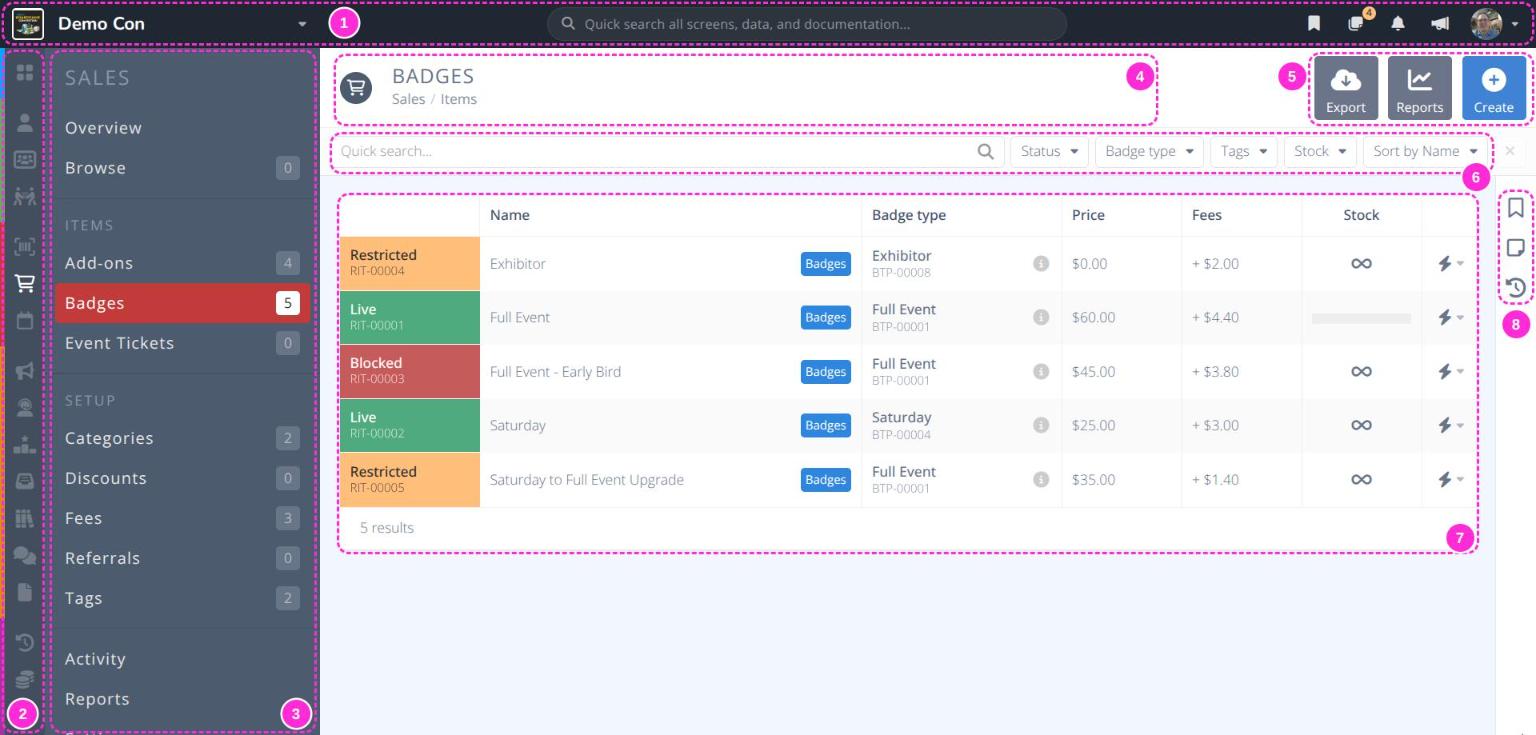
- Navigation bar - Switch conventions, search, and open your bookmarks, notes, notifications, platform updates and account menu. See
Navigation Bar. - Section bar - The colored icons down the far left switch between the main sections, such as and . Hover over an icon to see its name. See
Main Menu. - Side menu - The pages in the current section, grouped under headings such as ITEMS and SETUP. The page you are on is highlighted, and the number beside each page shows how many records it holds.
- Page header - The page title and breadcrumb (e.g. Sales / Items).
- Actions area - Buttons for the page, such as , and .
- Search and filters - Narrow and sort the list below. See
Grids. - Grid - The list of records on this page. Click a row to open it. See
Grids. - Workbar - Bookmark the page, leave admin notes and view its activity history. See
Workbar.
¶ Menu Breakdown
Main Menu- The convention dashboard and the color-coded sections of the main menuNavigation Bar- Quick search, bookmarks, notes, notifications, platform updates and your accountGrids- Searching, filtering, sorting and exporting lists of recordsRecords- The layout of a record and how to save your changesWorkbar- Bookmarks, admin notes and activity history for the page you are onActivity- The full history of changes in each section
¶ Tips for Finding Your Way
- Looking for something specific? Type a name or reference number (e.g. RIT-00001) into the
Quick Searchat the top of the screen. - Coming back to the same page often?
Bookmark it. - Need to leave a reminder for yourself or another admin? Add an
Admin Note. - Wondering who changed something? Check the
Activity Log.
Tip: Every record has a reference number made of a short code and a number, such as RIT-00001 for a sales item or BTP-00001 for a badge type. Reference numbers are the quickest way to search for a record and to tell records with similar names apart.