¶ Properties
Properties are the entities that are shown on the Explore Map and are where you will find your settings, conventions, and/or store.
¶ Overview
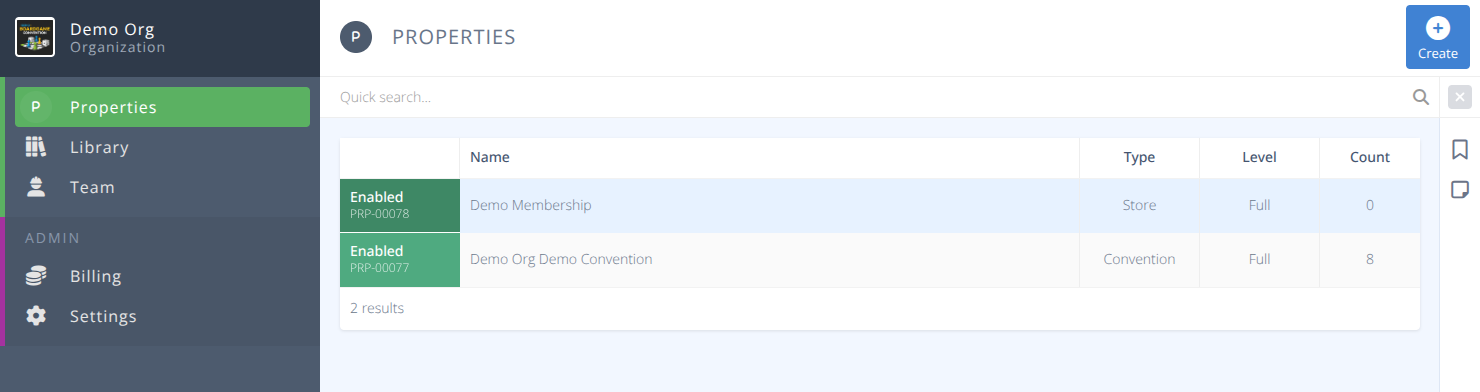
¶ Common Procedures for Properties
Create a PropertyManage a Property ProfileManage Property Settings- Visibility on the Map, How the Property Profile is handledCreate a Convention or Store
¶ Fields
Notes:
- Mandatory fields are denoted by a
- Fields that will be visible to an attendee or require care in naming are denoted by an
¶ Grid Fields
| Field | Details |
|---|---|
 Name |
The name of the property. This will be used as part of the URL of your convention/store and should be named carefully. i.e.) https://cardboardconnect/conventions/Property-Name e.g.) Demo Con will result in a URL of https://cardboardconnect/conventions/demo-con |
Type |
The type of property, one of: - Convention : A convention that is using the convention foundation of the platform. - Store : A store that is using the store foundation of the platform. |
Level |
The status of the property, one of: - Basic - The property will appear on the map as a generic dot. A drescription and basic details will be shown on the map - Plus - The property is paying the fee to have their logo on the map and a profile including access to the associated features - Profile - This level is not yet available. - Full - Conventions and Stores that are using the platform and generating fees of at least the same amount as a plus subscription receive the full package at no cost. |
Count |
The number of conventions/stores connected to the property |
¶ Additional Fields
| Field | Details |
|---|---|
| Description |
This description is shown on the Explore Map to anyone viewing your property |
| Logo |
This logo will be shown in the directory and on the map if the property level |
| Location |
Select the address of the property. This is where it will appear on the map. |
| Website |
A link to your primary website. Note: Links to other sites that provide similar services are not permitted. |
| Established |
The year your property was established. |
| Size |
The average number of attendees you have to your convention. |
| Lowest Adult |
The lowest priced admission or membership for your property. |
¶ Procedures
¶ Create a Property
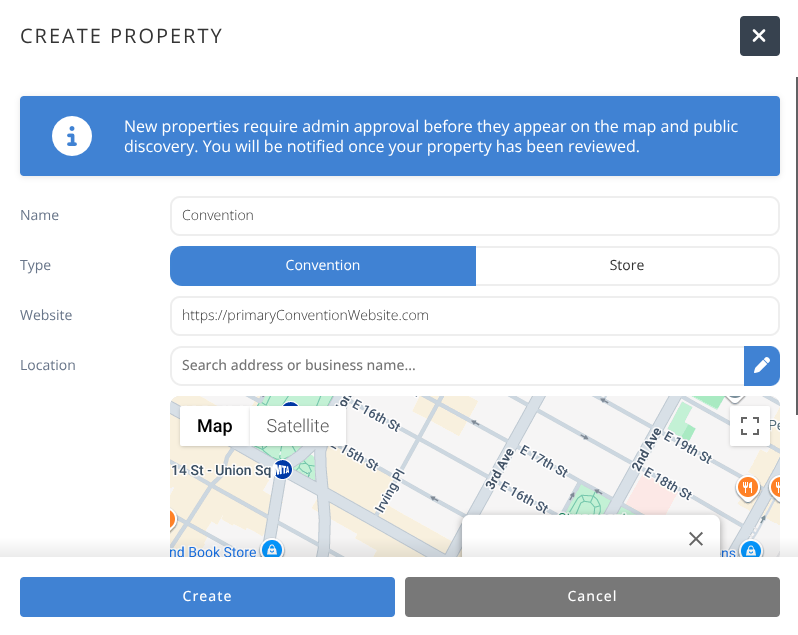
- From the menu click in the action area.
- Specify the Property Name. This is the name that will appear on the map level and should not contain any specifics such as the year.
- Specify the Property Type.
- Specify the Properties Main Website.
- Either find your business on the map or type in the address and select the correct row.
- Click .
- The property will be sent to Cardboard Connect for approval. You may still update the details of the property while it is pending, but will be unable to create any new conventions/stores until it is approved.
¶ Manage a Property Profile
- From the menu locate the property you wish to manage and click on the corresponding row.
- The tab will allow you to modify any of the following:
NameDescriptionLogo- Click the button to upload a new logo.
- Click the button to remove the current logo.
Location- Click the to change the location on the map.WebsiteEstablished- The year your convention was establishedSize- The average attendance of your convention or number of members of your storeLowest Adult- The price of the lowest adult badge or membership.
- When all settings are as desired click .
¶ Manage Property Settings
- From the menu locate the property you wish to manage and click on the corresponding row.
- The tab will allow you to modify any of the following:
-
Map- Determines if your property appear on the Explore map and directory. -
Profile- Determines what a user sees when navigating to your property, either:- Disabled - No profile page exists and only the Explore map will be shown.
- Enabled - The property has a standalone profile page for announcements, calendar, and information pages.
- Redirect - The property has a stanadalone profile page, but it redirect to their chosen store or convention interface.
¶ Create a Convention or Store
- From the menu locate the property you wish to manage and click on the corresponding row.
- The or menu will show you all of your existing entities on this property.
Select the Type of Entity you are creating for the next set of steps
-
To add a new Convention click .
-
Enter the specific Name for your new convention (the most common approach is to add the year).
-
Enter/Select the day your convention Starts On
-
Select the Duration of your new convention.
-
Set the Template to Blank
-
Enable/Disable the services that you will need or not need for your new convention.
a) Checkout - Attendees will be able to checkout games from your Library.
b) Sales - Attendees will be able to register badges and purchase other items.
c) Schedule - Attendees will be able to create and/or join scheduled events. -
Click .
- To add a new store click.
- Enter the specific Name for your new store (the most common approach is to add the year).
- Click .
- Your store will be created and can now be configured.